Edit PDF Text Online in Original Fonts
Change words, fix typos, and restyle text directly inside your PDF without uploading the document to a third-party server. PdfShilp brings true in-place PDF editing straight into your browser sandbox.
Why Client-Side PDF Text Editing Matters
Most web-based PDF editors require uploading your confidential files to a remote cloud server where they are converted into images or re-encoded, often leaking sensitive personal data and ruining typography. PdfShilp uses WebAssembly to parse and rewrite PDF text objects entirely on your device. Your contract, invoice, or resume never leaves your computer, ensuring total confidentiality and instant editing performance with zero upload latency.
Preserving Document Typography and Embedded Fonts
When you click a text block in PdfShilp, our typography engine analyzes the underlying font metrics, point size, matrix transformations, and character spacing. When you type new characters, the editor utilizes the embedded OpenType/TrueType subsets already packed into the PDF or applies intelligent base-14 fallback substitutions. This ensures that corrected words, adjusted numbers, and rephrased sentences blend seamlessly into the existing page layout without visible seams or displaced baselines.
How to Edit Existing Text in Your PDF
- Step 1: Open your PDF directly in the browser by dragging and dropping it into the workspace.
- Step 2: Click on the line or paragraph you wish to alter. An active editor overlay appears immediately.
- Step 3: Type your replacement text, fix misspelled words, or update numbers and dates.
- Step 4: Click outside or press Ctrl+Enter (Cmd+Enter on Mac) to commit. Choose Download edited PDF (Save on mobile) and check the downloaded PDF.
Security & Zero-Upload Privacy Guarantee
PDF parsing and editing run in your browser. Your document is not uploaded to a server. Local processing alone does not establish legal or regulatory compliance; review your own document-handling requirements.
Example: correct an appointment letter without uploading it
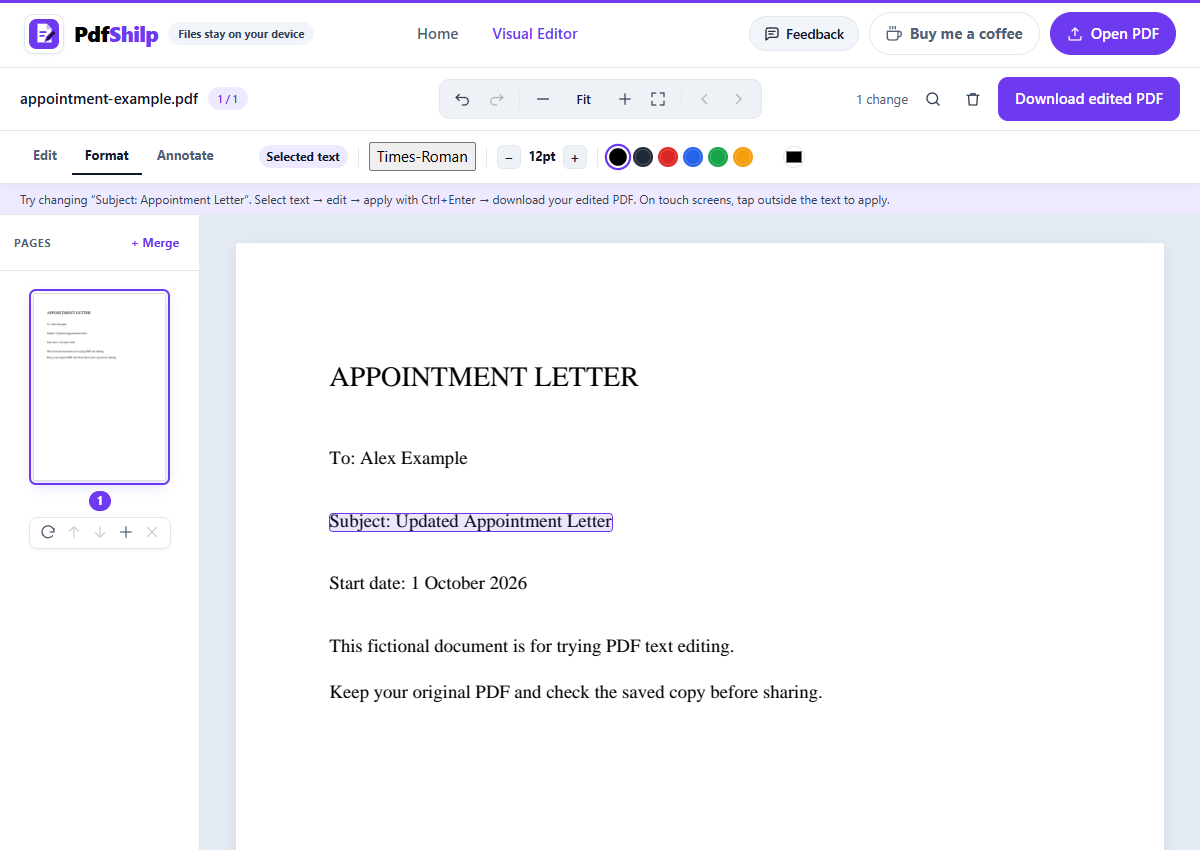
Use this fictional appointment letter to try PdfShilp before opening your own document. The sample contains selectable PDF text, not a scanned image.
Download the fictional sample appointment letter
- Download the sample appointment letter below, then open it in PdfShilp using Open PDF or the file drop area.
- Choose Edit text in the toolbar and click the Subject: Appointment Letter line. Use the arrow keys to position the cursor, or drag to select the words you want to replace.
- Change the subject to Subject: Updated Appointment Letter. Press Ctrl+Enter (Cmd+Enter on Mac), or click outside the editor, to commit. Enter alone adds a new line; Escape cancels the active edit.
- Choose Download edited PDF (Save on mobile), then reopen the downloaded PDF to check the subject, font, line breaks, and surrounding text. Keep the original file until you have checked the result.
Before you edit your own PDF
- Scanned pages contain images rather than selectable text. PdfShilp does not currently provide OCR to turn those images into editable text.
- PDF fonts often contain only a subset of characters. New characters can require a substitute font; PdfShilp reports substitutions, and the appearance may change.
- Longer edits can change line wrapping and spacing. Check the saved PDF before sharing it. Refreshing the page loses unsaved edits.
Frequently Asked Questions
How do I edit existing text in a PDF for free?
Open your PDF in PdfShilp, click on any text block on the page, type your desired corrections, and save the updated document. There are no subscriptions, account registrations, or page limits.
Will the edited text match the original font of the PDF?
Yes. PdfShilp inspects embedded font metrics and character encodings. Whenever available, it preserves the original font geometry so your edits match the surrounding typography naturally.
Are my documents uploaded to an external server?
No. All parsing, rendering, and byte rewrites execute 100% inside your browser using WebAssembly. Your files are never stored or seen by anyone.
Can I edit multi-line paragraphs and reflow text?
Yes. PdfShilp includes paragraph grouping and text rewrapping features that adjust line breaks dynamically while respecting your page margins and column widths.